Main Page: Difference between revisions
Dahaddican (talk | contribs) |
|||
| (124 intermediate revisions by 6 users not shown) | |||
| Line 1: | Line 1: | ||
The [https://ada.edu.au/ Australian Data Archive (ADA)] provides a national service for the collection and preservation of digital research data. ADA disseminates this data for secondary analysis by academic researchers and other users. | |||
The ADA | |||
= Deposit Process Overview = | |||
If you are interested in depositing data with the Australian Data Archive, please write an email to ada@ada.edu.au outlining the topic of your research and the nature of the data, e.g. sensitivity, data type, and quantity of files and size. The ADA will assess each deposit request against a set of criteria, see [[Deposit Appraisal & Collection Policy]]. Once the data has been accepted, the ADA will create a deposit shell on a secure system for the depositor to upload the data, the documentation files and enter metadata (see [[Quick Deposit Guide]] for instructions on what to upload). As part of the curation process, the ADA will view the deposit and make suggestions for changes if necessary (see [[Workflows]] for details). When the curation is complete, the depositor has the opportunity to preview the final version of the deposit on a designated review page. Once the depositor approves the review, the deposit is published on the [https://dataverse.ada.edu.au/|dataverse: ADA dataverse] and will receive a permanent DOI. | |||
[[File:Deposit_graph_4.png|1200px|center]] | |||
== | ==Archival Steps explained once data has been approved for deposit== | ||
===Deposit Shell=== | |||
* ADA creates a deposit dataset shell on ADA's DEPOSIT Dataverse whete the depositor/data custodian uploads data, and is able to enter study and file level metadata into the metadata fields (e.g. Title, Author...). | |||
* | * As part of this process the archivist and depositor(s) discuss the ADA Data License agreement. | ||
* Once the depositor confirms they have completed the file uploads and metadata they inform the archivist that their deposit is ready for ADA's archival processing. This entails the deposit internally being ingested into the archival and storage management system. | |||
* | |||
===Archival Data Curation Process=== | |||
* | * Archivists check the data for confidentiality and completeness. | ||
* | * An archive Processing Report is sent to the depositor/data custodian to respond to any recommended changes. The archivist then makes any amendments and uploads the dissemination (publication) version of the data to ADA's test Dataverse. | ||
===Review of data & metadata=== | |||
* The archivist provides the depositor/data custodian a link to the test Dataverse to verify that the dataset metadata and data are correct. | |||
* | |||
===Publication=== | |||
* | * Once approval of the test version has been received from the depositor/data custodian, the data and metadata are migrated to the [https://dataverse.ada.edu.au/ production Dataverse], and the dataset is published for user access, based on the ADA Data License agreement. | ||
===ADA Data License Agreement=== | |||
* | * The archivist will provide the ADA Data License agreement and confirm suitable options with the data custodian throughout the deposit and curation process. | ||
== To get started, go to [https://docs.ada.edu.au/index.php/Quick_Deposit_Guide Quick Deposit Guide]== | |||
For more detailed information on all the steps in the process see [https://docs.ada.edu.au/index.php/Workflows Workflows] | |||
ADA website, please go to https://ada.edu.au/ | |||
( | = ADA Archival Workflow Diagram = | ||
ADA bases its archival workflow on the Open Archival Information System (OAIS) Reference Model (2012). | |||
Diagram:[https://docs.ada.edu.au/images/e/eb/CTS_ADA-NCI_RDS-Storage_V8_2025_10_21_wiki.png ADA Archival Workflow based on OAIS Reference Model]. | |||
== | = Australian Data Archive Overview = | ||
* [ | |||
* [ | *[[Background Information and Context]] | ||
* [ | |||
* [ | Organisational Infrastructure | ||
* [ | |||
*[[Mission & Scope]] | |||
*[[Rights Management]] | |||
*[[Continuity of Service]] | |||
*[[Legal & Ethical]] | |||
*[[Governance & Resources]] | |||
*[[Expertise & Guidance]] | |||
Digital Object Management | |||
*[[Provenance and authenticity]] | |||
*[[Deposit Appraisal & Collection Policy]] | |||
*[[Preservation plan]] | |||
*[[Quality Assurance]] | |||
*[[Workflows]] | |||
*[[Discovery and Identification]] | |||
*[[Reuse]] | |||
*[[Setting Access Conditions]] | |||
Information Technology & Security | |||
*[[Storage & Integrity]] | |||
*[[Technical Infrastructure]] | |||
*[[Security]] | |||
= Australian Data Archive Projects = | |||
See the [[ADA Projects]] page for outlines in detail ADA's involvement in multiple projects etc | |||
= Superseded page = | |||
* [[ADA Self-Deposit - To Documentation Guides]] | |||
* [[1. ADA Collection Policy Criteria Assessment]] | |||
* [[2. Deposit Preparation]] | |||
Latest revision as of 03:53, 22 October 2025
The Australian Data Archive (ADA) provides a national service for the collection and preservation of digital research data. ADA disseminates this data for secondary analysis by academic researchers and other users.
Deposit Process Overview
If you are interested in depositing data with the Australian Data Archive, please write an email to ada@ada.edu.au outlining the topic of your research and the nature of the data, e.g. sensitivity, data type, and quantity of files and size. The ADA will assess each deposit request against a set of criteria, see Deposit Appraisal & Collection Policy. Once the data has been accepted, the ADA will create a deposit shell on a secure system for the depositor to upload the data, the documentation files and enter metadata (see Quick Deposit Guide for instructions on what to upload). As part of the curation process, the ADA will view the deposit and make suggestions for changes if necessary (see Workflows for details). When the curation is complete, the depositor has the opportunity to preview the final version of the deposit on a designated review page. Once the depositor approves the review, the deposit is published on the ADA dataverse and will receive a permanent DOI.

Archival Steps explained once data has been approved for deposit
Deposit Shell
- ADA creates a deposit dataset shell on ADA's DEPOSIT Dataverse whete the depositor/data custodian uploads data, and is able to enter study and file level metadata into the metadata fields (e.g. Title, Author...).
* As part of this process the archivist and depositor(s) discuss the ADA Data License agreement.
- Once the depositor confirms they have completed the file uploads and metadata they inform the archivist that their deposit is ready for ADA's archival processing. This entails the deposit internally being ingested into the archival and storage management system.
Archival Data Curation Process
- Archivists check the data for confidentiality and completeness.
- An archive Processing Report is sent to the depositor/data custodian to respond to any recommended changes. The archivist then makes any amendments and uploads the dissemination (publication) version of the data to ADA's test Dataverse.
Review of data & metadata
* The archivist provides the depositor/data custodian a link to the test Dataverse to verify that the dataset metadata and data are correct.
Publication
- Once approval of the test version has been received from the depositor/data custodian, the data and metadata are migrated to the production Dataverse, and the dataset is published for user access, based on the ADA Data License agreement.
ADA Data License Agreement
- The archivist will provide the ADA Data License agreement and confirm suitable options with the data custodian throughout the deposit and curation process.
To get started, go to Quick Deposit Guide
For more detailed information on all the steps in the process see Workflows
ADA website, please go to https://ada.edu.au/
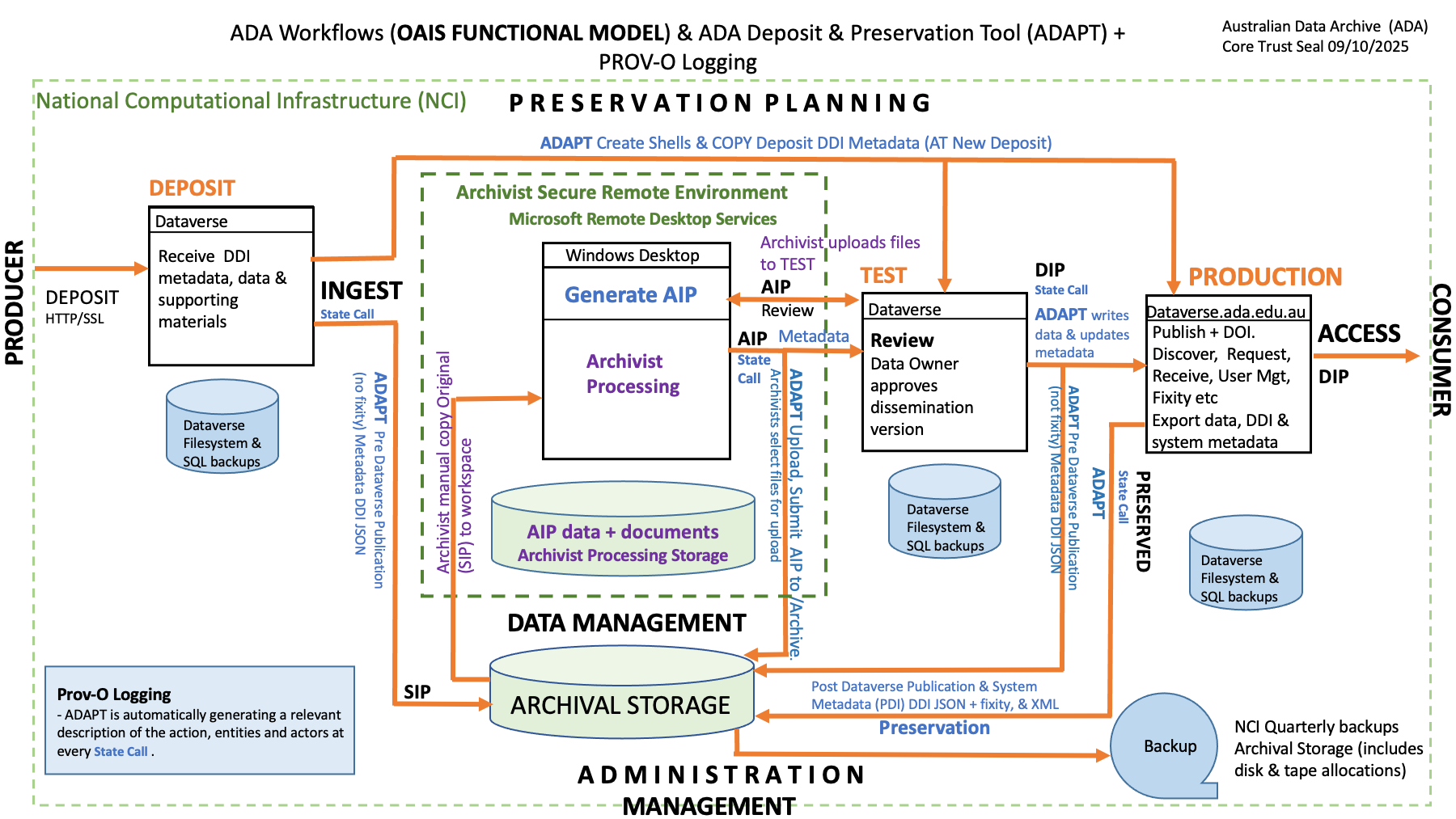
ADA Archival Workflow Diagram
ADA bases its archival workflow on the Open Archival Information System (OAIS) Reference Model (2012).
Diagram:ADA Archival Workflow based on OAIS Reference Model.
Australian Data Archive Overview
Organisational Infrastructure
- Mission & Scope
- Rights Management
- Continuity of Service
- Legal & Ethical
- Governance & Resources
- Expertise & Guidance
Digital Object Management
- Provenance and authenticity
- Deposit Appraisal & Collection Policy
- Preservation plan
- Quality Assurance
- Workflows
- Discovery and Identification
- Reuse
- Setting Access Conditions
Information Technology & Security
Australian Data Archive Projects
See the ADA Projects page for outlines in detail ADA's involvement in multiple projects etc